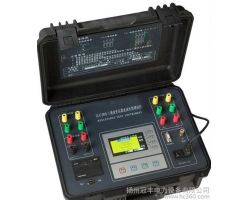
Inductive Load DC Resistance Tester
Usage:
1. Grounding:
When the ambient electromagnetic interference is severe or the test object is inductive, connect the instrument's ground terminal to the test object's ground (or earth) with a wire to eliminate external interference, resulting in more stable measurement data.
2. Selecting Range:
First, estimate the resistance of the test object and select an appropriate range. If the approximate resistance range cannot be determined, choose a larger range. (Adjust the range after discharging) so that the displayed value (ignoring the decimal point) is between 1999 and 19999, which is the most suitable range, providing the highest data accuracy. If the display shows "1", it indicates over-range.
3. Zero Adjustment:
Zero adjustment is required when using the "20mΩ" and "200mΩ" ranges. After connecting the test resistor, in the "Ready" state, adjust the "Zero" knob until the display shows zero. Other ranges automatically zero without calibration.
4. Measurement:
After completing the above preparations, set the "Ready/Measure" key to the "Measure" position. Once the displayed data stabilizes, take the reading and include the unit of the selected range. Note that the larger the inductance of the test object, the longer it takes for the data to stabilize.
5. Discharge:
Before turning off the power, set the "Ready/Measure" key to the "Ready" position, then turn off the power. If the test object is inductive, the instrument will automatically discharge it. At this time, observe the "Discharge Indicator" light; only after it goes out can you proceed with disconnecting wires, to prevent the inductive back EMF from endangering personal safety. After each set of measurements, you must turn off the power to discharge before measuring another set.
Operating Methods:
1. Resistance Measurement
After powering on or pressing the reset key, the instrument enters the initial state (1). At this time, the cursor points to "Resistance". Press the "OK" key directly to enter state (2), displaying the changing charging current and measurement time. After charging is complete, it automatically enters state (3), displaying the resistance value, measurement current, and measurement time. Each time you press the "OK" key, a measurement result is stored (models with a printer also print the result). Press the "Reset" key to exit resistance measurement and enter state (4), displaying the discharge current. After discharge ends, it automatically returns to the initial state (1), completing one resistance measurement.
2. Number Setting
Entering a device number helps in searching memory data. In the initial state (1), point the cursor to "Settings" and press the "OK" key to enter state (5), displaying the current device number. Press "OK" again to enter state (6), prompting for a new device number. At this time, pressing the "Select" key cycles the current input digit from '0' to '9', then from 'A' to 'Z'. After finding the desired number or letter, press "OK" to input that digit. Repeat the same method for the next digit. After entering six digits, return to state (5), displaying the newly entered device number. Press "