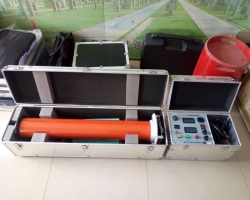
1. Digital Ammeter: Digitally displays the DC high voltage output current.
2. Digital Voltmeter: Digitally displays the DC high voltage output voltage.
3. Yellow illuminated button: Active when the red light is on. When the yellow button is pressed, the yellow light turns on, the output high voltage drops to 0.75 times the original value, and this state is maintained for one minute. This function is specifically for quick measurement of 0.75UDC-1mA for zinc oxide arresters. Pressing the green button turns off both red and yellow lights, cutting off the high voltage and exiting the 0.75 times state.
4. Red illuminated button: High voltage connection button and high voltage indicator light. When the green light is on, pressing the red button turns on the red light and turns off the green light, indicating that the high voltage circuit is connected and voltage can be increased. This button is only effective when the voltage adjustment potentiometer is at zero. If the red light turns on but the green light remains on when the red button is pressed, and the red light turns off and the green light turns on when the button is released, it indicates that the internal protection circuit has activated. In this case, the machine must be turned off to check whether the overvoltage setting dial switch is set to less than 5% of the full scale and for any other faults before restarting.
5. Green illuminated button: The green light indicates that the power is connected and the high voltage is disconnected. When the red light is on, pressing the green button turns off the red light and turns on the green light, cutting off the high voltage circuit.
6. Power switch: Press this switch to the right to turn on the power, and the green light turns on. Press it to the left to turn off.
7. Overvoltage setting dial switch: Used to set the overvoltage protection value. The overvoltage setting range is 0.05 to 1.2 times the rated voltage, and the value displayed on the dial switch is in kV.
8. Voltage adjustment potentiometer: This potentiometer is a multi-turn potentiometer. Rotate clockwise to increase voltage, counterclockwise to decrease. This potentiometer has electronic zero-position protection, so it must be returned to zero before increasing voltage.
9. Power input socket: Connect the provided power cord to the power input socket. (AC 220V±10%, the socket has a built-in fuse.)
10. Grounding terminal: This grounding terminal is connected to the grounding terminal of the voltage doubling cylinder and the test object grounding, and then connected to the grounding grid as a single point.
11. Medium frequency and measurement cable quick connection socket: Used to connect the control box and the voltage doubling part. When connecting the DC high voltage generator, simply align the cable plug with the socket and push it into place. To disconnect, move the outer collar of the cable plug backward and pull with slight force.
Product Completeness:
1. Control box 1 unit;
2. Voltage doubling cylinder 1 unit;
3. Power cord 1 piece;
4. Medium frequency output cable 1 piece;
5. Spare fuse 5A 5 pieces;
6. User manual 1 copy;
7. Product inspection certificate and warranty card 1 copy;
8. Factory acceptance test report 1 copy;
9. Rod 1 set;
10. Special grounding wire 1 piece;
11. High voltage connecting wire 1 piece
12. Aluminum alloy carrying case 1 set
Keywords: 200KV/5mA DC High Voltage Generator for Power Cable Testing, 200KV/5mA DC High Voltage Generator for Power Cable Testing